14 Nov
On this page 9
What is virtualization?
- Virtualization is a technology that allows you to create multiple simulated (virtual) environments or systems from a single physical hardware system.
What is a Hypervisor and Types?
- Makes virtualization possible
- Type 1 Hypervisor: HW, Hypervisor (Basically bare metal where Hypervisor runs OS as well)
- Type 2 Hypervisor: HW, OS, Hypervisor (VMWare acts as Hypervisor to create Kali or Ubuntu boxes)
What is Cloud?
- Take Uber as an example, we do not pay for car insurance or cleaning or anything else except for the trip.
- Similarly with AWS Cloud, we rent the services/infra that we need and nothing more.
What is Cloud Computing?
- Cloud:
- Rented Infra
- Computing:
- Processing
- Example is ChatGPT where we ask it to do something and it processes on OpenAI's servers.
Advantages of Cloud
- No need to invest in expensive hardware - pay only for what you use (pay-as-you-go model).
- Easily scale up or down resources based on demand - ideal for businesses with variable workloads.
- Cloud providers offer redundant infrastructure and global data centers to ensure uptime and business continuity.
- Quickly deploy servers, storage, and apps in minutes, enabling faster innovation and time to market.
- Regular security patches, encryption, and monitoring are handled by the cloud provider.
- Multiple users can work on the same files or applications in real time from different locations.
- Automatic cloud backups protect you from accidental deletions or data corruption.
Disadvantages of Cloud
- You need a stable internet connection to access cloud services. No internet = No access to your data or apps.
- Storing sensitive data in the cloud may expose it to cyberattacks, data breaches, or insider threats if not properly managed.
- Users don't have full control over the underlying hardware and backend systems - you rely on the provider.
- While there's no upfront hardware cost, long-term usage or scaling can become expensive without proper cost management.
AWS Infra
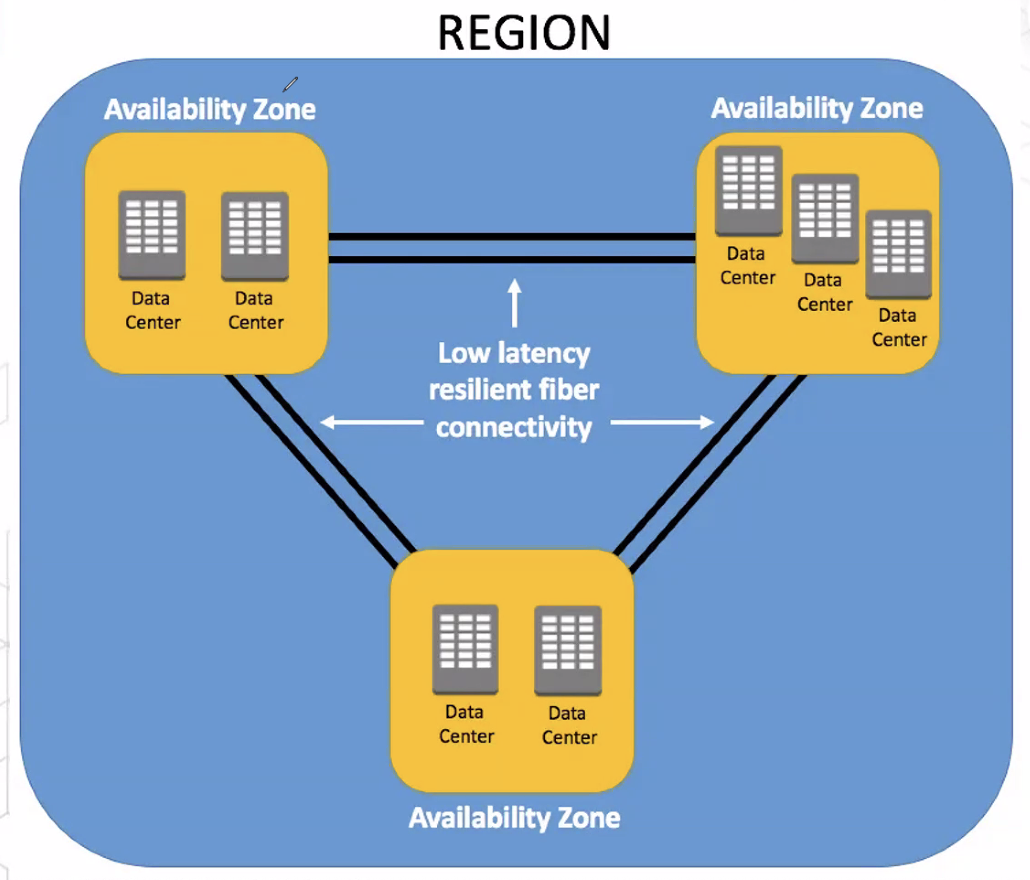
- Region = Geographic Area:
- An AWS Region is a big geographical location like Mumbai, London, or Ohio, where AWS has its infrastructure. Each region operates independently for better control and compliances.
- Availability Zone (AZ) = Separate Building Clusers:
- Each region has 2 or more AZs, which are separate data centers placed close to each other but not in the same building - this helps in high availability and disaster recovery.
- They are connected to each other via Low Latency resilient fiber connectivity.
- Data Center = Physical Servers:
- A data center is the actual building where AWS keeps servers, networking devices, and storage systems. Each AZ can have one or more data centers.
Notes
- Region: you can see it in the map, you can deploy the resources.
- AZ: you cannot see it in the map, you can deploy the resources.
- Data Center: you cannot see, you cannot deploy the resources directly, the deployment is done by the AWS on our behalf.
EC2 (Elastic Compute Cloud)
EC2 lets you create VMs (called instances) on AWS to run your applications - just like using your own computer but in the cloud.
You can choose the CPU, memory, storage, and OS as per your needs - for example, Linux or Windows, small or large instance types.
You only pay for the time and resources you use, making it cost-effective - stop or terminate instances anything to save money.
EC2 can automatically scale up or down the number of instances based on traffic, ensuring your app always performs well.
Security Group: Firewall for your instance.
- 5 Types of Firewalls
Instance: your server.
Instance Type: your Hardware.
AMI (Amazon Machine Image): Operating System.
Volume: Hard disk / Data storage
User data: Used to launch Wireshark, EDR, Agents in your instance (Done using a script).
Us-east-1b:
- Us-east-1: Region of Deployment
- b: Availability Zone
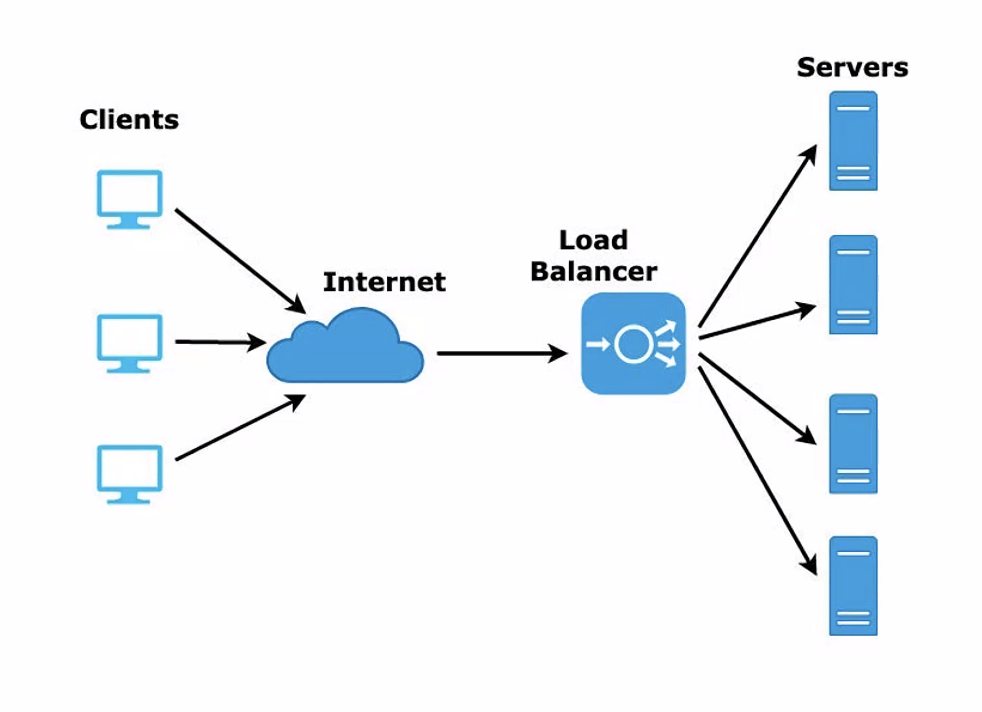
Load Balancer
- In AWS, it is called ELB (Elastic Load Balancer).
- It is managed by AWS and AWS guarantees it will be working.
- This is the one that is public facing.
- Behind ELB, we have multiple EC2 instances.
- ELB performs health check of the instances.
Types of Load Balancers
- Application Load Balancer (ALB)
- Operates at Layer 7 (Application Layer).
- Distributes HTTP and HTTPS traffic based on URL paths, hostnames, and other request details.
- Example: Routes /login requests to one server and /products requests to another server.
- Network Load Balancer (NLB)
- Operates at Layer 4 (Transport Layer).
- Handles high volumes of TCP, UDP, and TLS traffic with low latency.
- Gives you a Static IP and not a Static URL.
- High performance and can handle millions of requests per second.
- Example: Distributes gaming or application traffic across multiple servers.
- Gateway Load Balancer (GWLB)
- Operates at Layer 3 (Network Layer).
- Handles traffic load balancing + security check for the traffic.
- Example: Routes network traffic through multiple firewalls for security inspection.
- Classic Load Balancer (CLB)
- Legacy AWS load balancer that operates at Layer 4 and Layer 7.
- Distributes incoming traffic across multiple EC2 instances.
- Example: Balances HTTP requests across multiple web servers in older AWS applications.